This article explains how to automatically assign incoming leads to specific users in Dealer Studio using Lead Cluster Assignment Rules. This helps ensure leads are routed to the right team members without manual intervention.
Set Up Lead Cluster Assignment Rules
Follow the steps below to create an automatic lead assignment rule.
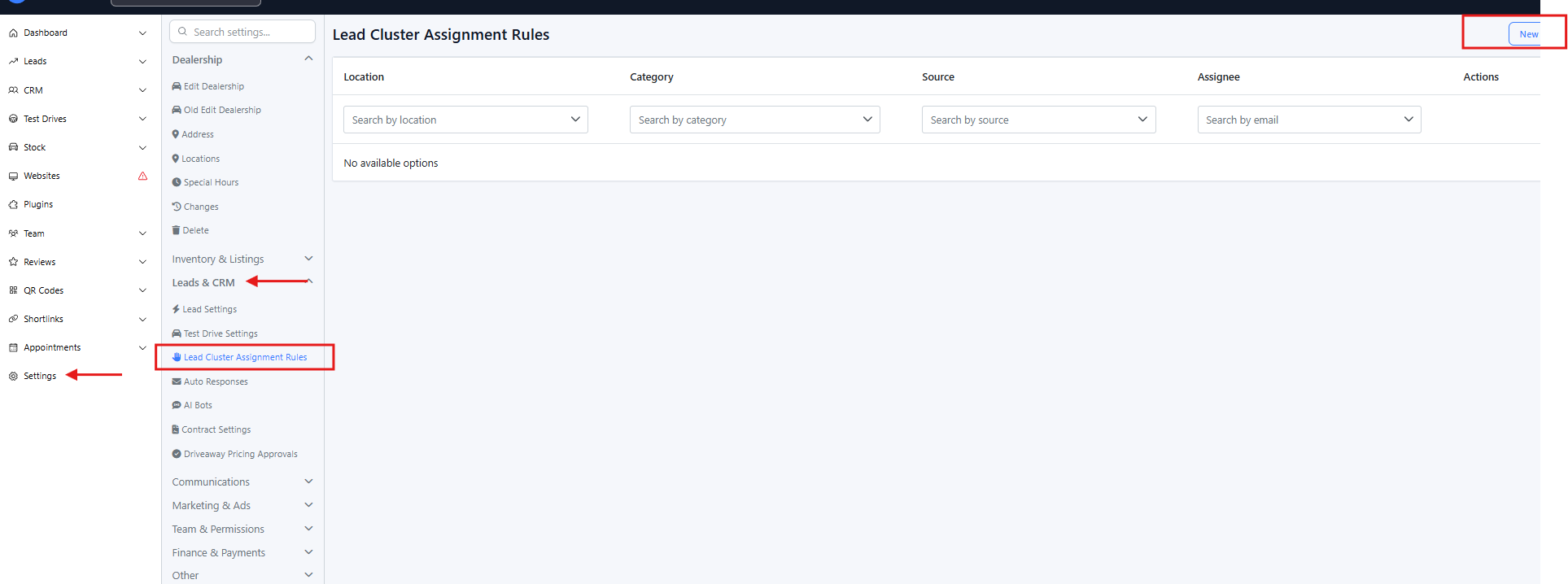
Step 1: Navigate to Lead Cluster Assignment Rules
Log in to your Dealer Studio dashboard.
Go to:
SettingsUnder Leads & CRM, select Lead Cluster Assignment Rules.
Step 2: Create a New Assignment Rule
In the top-right corner of the page, click New.
Complete the following fields:
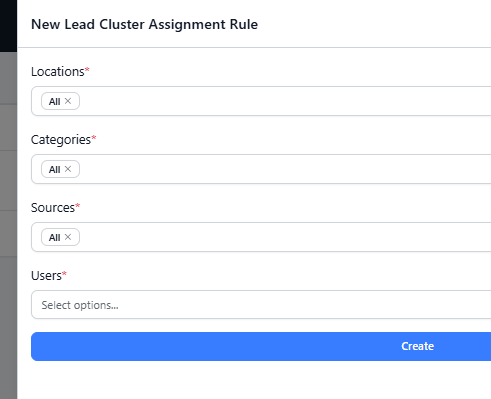
Locations
Select the dealership location(s) this rule should apply to.Categories
Choose the lead category (eg: General Enquiry, Used Vehicle Enquiry, Service Enquiry, etc.).Sources
Select where the lead is coming from (such as website forms, third-party portals, or integrations).Users
Select the user(s) you want the leads to be automatically assigned to.
⚠️ If you need help creating or managing users, refer to: How to Add a New User
Click Create to activate the assignment rule.
Once saved, any new leads that match the selected criteria will be automatically assigned to the chosen user(s).
Managing Assignment Rules
After a rule is created, you can:
Edit the rule to update locations, categories, sources, or assigned users
Delete the rule to disable automatic assignment
Changes take effect immediately after saving.
Tips & Best Practices
Create more specific rules first to avoid overlap.
Regularly review assignment rules when team members or lead sources change.
Ensure users have access to the correct locations and lead categories.
Was this article helpful?
That’s Great!
Thank you for your feedback
Sorry! We couldn't be helpful
Thank you for your feedback
Feedback sent
We appreciate your effort and will try to fix the article