Overview
Dealer Studio now automatically generates a written summary of phone call transcriptions for all inbound calls received through your Dealer Studio tracking number. This gives your team a quick, readable overview of every tracked call — directly inside the lead record, with no manual notes required.
Note: This feature is available for dealerships that have an active Dealer Studio tracking phone number. See Purchasing a Tracking Phone Number below if your dealership does not yet have one.
What You'll See
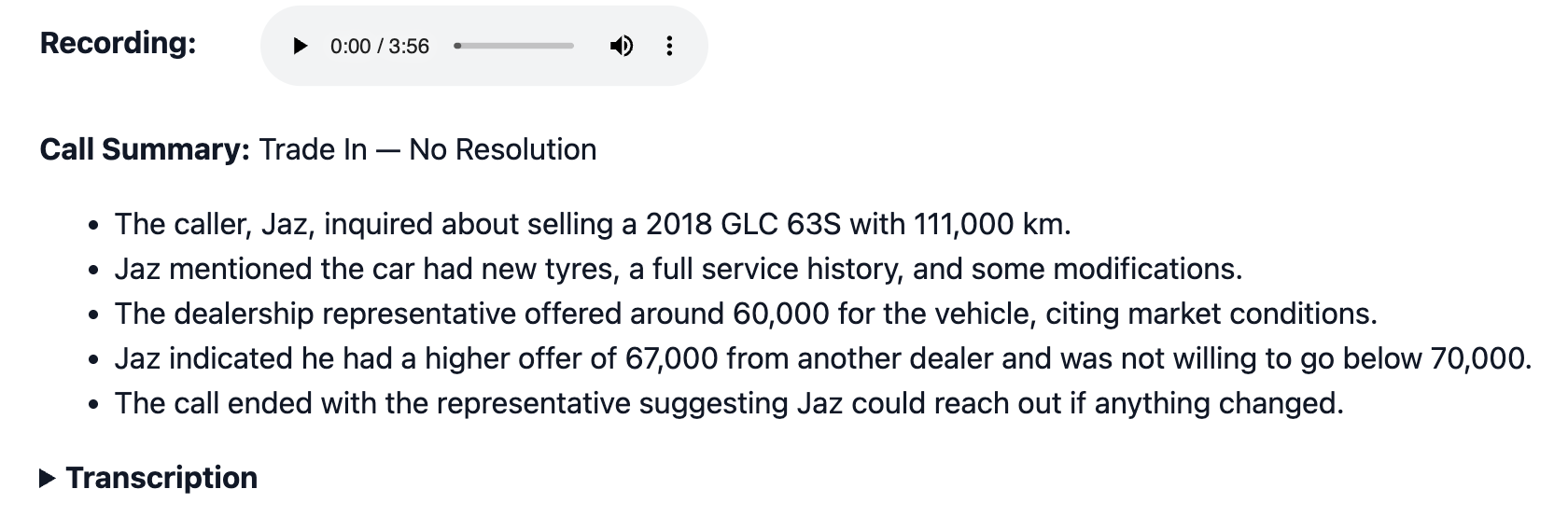
When a phone call is received through your tracking number, Dealer Studio automatically transcribes the call and generates a plain-English summary. The summary appears inside the lead cluster associated with that call.
To view a call summary, navigate to Leads in your dashboard and open the relevant lead cluster. The call summary will be displayed within the call record.
Requirements
To use Phone Call Summaries, your dealership must have an active Dealer Studio tracking phone number. Calls made to or from standard (non-tracking) numbers will not be transcribed or summarised.
- An active Dealer Studio tracking number must be set up for your dealership
- Summaries are generated for calls received from 18 March 2026 onwards
- No additional configuration is required — summaries are enabled automatically once a tracking number is active
Purchasing a Tracking Phone Number
If your dealership does not yet have a tracking number, follow
Frequently Asked Questions
Do I need to enable call summaries manually?
No. If your dealership has an active tracking phone number, call summaries are generated automatically — no setup required.
Are summaries available for calls made before this feature launched?
No. Call summaries are only available for calls received from 18 March 2026 onwards.
Where exactly do I find the call summary?
Open the relevant lead cluster in your Leads dashboard. The summary will appear within the phone call record inside that cluster.
What if we don't have a tracking number?
You will need to purchase a Dealer Studio tracking number to access this feature. See the Purchasing a Tracking Phone Number section above.
Was this article helpful?
That’s Great!
Thank you for your feedback
Sorry! We couldn't be helpful
Thank you for your feedback
Feedback sent
We appreciate your effort and will try to fix the article