Overview
When a customer submits a Sell My Car (SMC) or trade-in enquiry, they have the option to upload photos of their vehicle as part of the enquiry process. Photos are optional for the customer, so they may skip that step. If no photos were submitted, you can request them directly from the Valuations view, which will send the customer an SMS with a link to upload their images.
How Customers Upload Photos
During the SMC or trade-in enquiry flow, customers reach an "Add Photos" step where they can upload images of their vehicle. The following photo slots are available:
- Front
- Back
- Right Side
- Dashboard
- Dashboard (Interior)
- Backseats
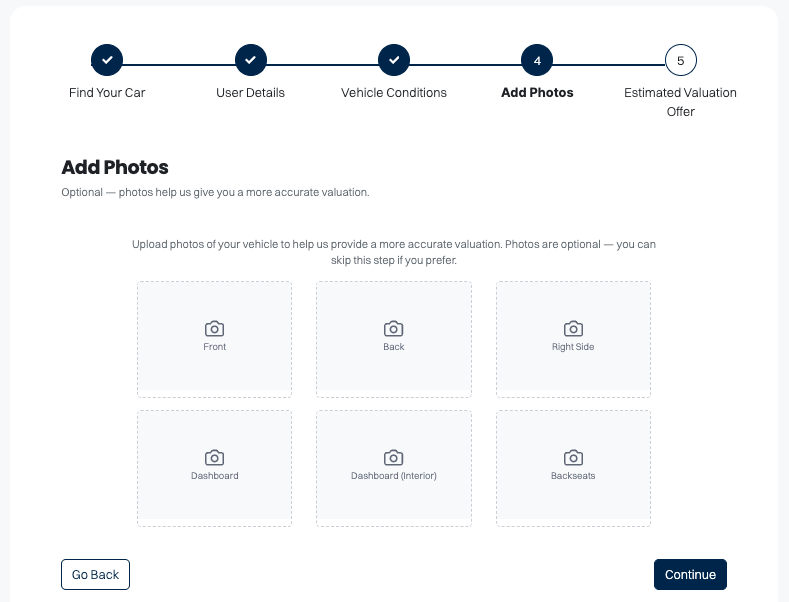
This step is optional, so customers may continue without uploading any photos.
Requesting Photos from a Customer
If a customer did not upload photos with their enquiry, you can send them a photo request via SMS from the Dealer Studio dashboard.
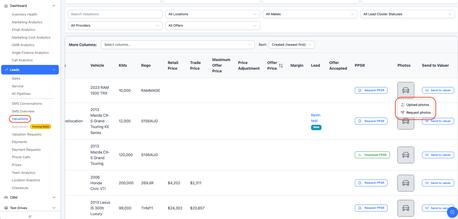
- Go to Leads and select Valuations.
- Find the relevant enquiry in the list and scroll across to the Photos column.
- Click the Photos icon for that enquiry.
- From the dropdown that appears, select Request Photos.
- A confirmation dialog will appear showing a preview of the SMS that will be sent to the customer. The message includes a personalised link for the customer to upload their photos.
- Click Send SMS to send the request.
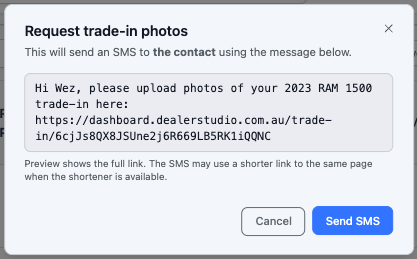
The customer will receive an SMS with a link that takes them directly to the photo upload page for their vehicle.
Notes
- The SMS is sent to the contact number associated with the enquiry.
- The link in the SMS may be shortened when a URL shortener is available.
- You can also manually upload photos on behalf of a customer by selecting Upload Photos from the same dropdown.
Was this article helpful?
That’s Great!
Thank you for your feedback
Sorry! We couldn't be helpful
Thank you for your feedback
Feedback sent
We appreciate your effort and will try to fix the article