We've introduced two new ways to set up and manage notifications, giving your team more control over how and when they're alerted to activity in the system.
1. Event-Driven Notifications
Automatically notify the right people when specific events occur in your system.
How it works: Instead of broad, catch-all alerts, you can now configure notifications that trigger based on a specific event. The notification is then sent to the relevant staff member at that location.
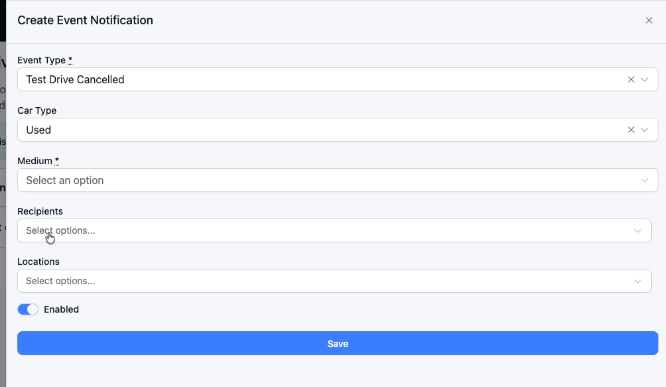
Example: When a test drive is scheduled for a Used Car at your Narellan location, the Pre-Owned Sales Manager at Narellan is automatically notified, no one else.
Why it matters: This ensures the right person is always in the loop without unnecessary noise for the rest of the team.
2. Custom Page Notifications (article here)
Set up targeted notifications directly from any landing page in the system.
How it works: On any landing page, you can now assign a notification to a specific user or group of users - straight from the page itself, without needing to navigate away or configure it elsewhere.
Example: On your Tyre Promotion landing page, you can set it so that whenever a form is submitted, a specific staff member (or multiple team members) receives an instant notification.
Why it matters: This removes the need to manage notification settings separately and gives you more flexibility when running campaigns or promotions with dedicated landing pages.
Was this article helpful?
That’s Great!
Thank you for your feedback
Sorry! We couldn't be helpful
Thank you for your feedback
Feedback sent
We appreciate your effort and will try to fix the article