You can quickly check whether the Google Tag Manager container GTM-OJSRQT is installed on your website using your browser. Please follow the steps below:
Step 1 – Open your website or specific webpage
Open your website homepage in Google Chrome.
Step 2 – Open the browser developer tools
1. Right-click anywhere on the page.
2. Click Inspect.
Step 3 – Search for the GTM container
1. In the developer panel that opens, press Ctrl + F (or Cmd + F on Mac).
2. Search for the following ID:
GTM-OJSRQTStep 4 – Check the result
1. If the container is installed, you should see it appear inside a script referencing googletagmanager.com.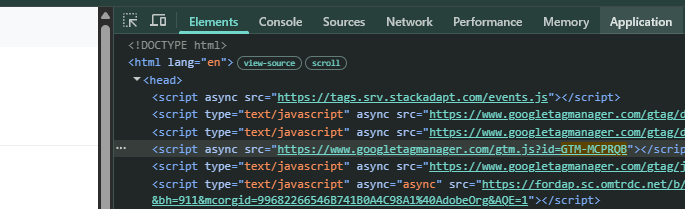
2. If you cannot find GTM-OJSRQT, it means the container is not currently installed on the page. You may contact support@dealerstudio.com.au to have them installed.
Was this article helpful?
That’s Great!
Thank you for your feedback
Sorry! We couldn't be helpful
Thank you for your feedback
Feedback sent
We appreciate your effort and will try to fix the article